DXR · RandomX · Testnet
A private coin
you mine with your own computer
Daxyra is a private digital currency mined on ordinary CPUs, with a fixed supply of 24,000,000 DXR. Every transaction hides the sender, the receiver and the amount.

What is Daxyra?
Anyone can mine
RandomX is designed for everyday CPUs and resists ASIC miners. An ordinary computer is enough to take part.
Private by default
One-time addresses, 16-member ring signatures, Bulletproofs and Dandelion++, payments sent through the Tor built into the wallet by default (hides the sender's IP, nothing to install) and I2P support: outsiders cannot see who sent, who received or how much.
Fixed supply
At most 24 million DXR, the reward halves about every 4 years, and there is no tail emission.
Features
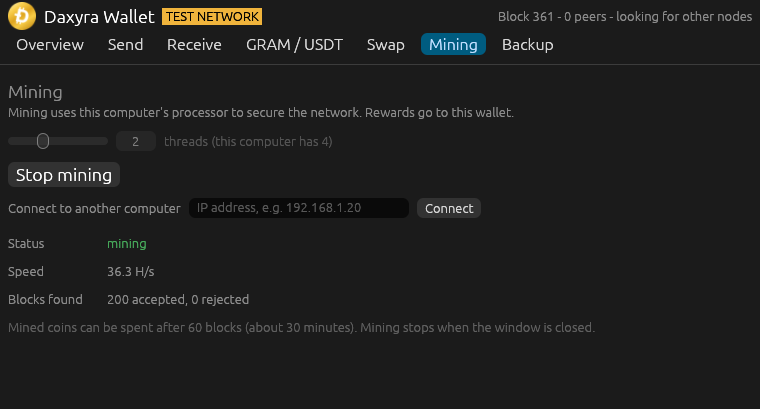
Mines on every CPU core; the RandomX key changes every 2048 blocks.
LWMA difficulty is recomputed every block to keep a 30-second pace.
Initial reward per block, halved every 4,207,680 blocks (about 4 years).
Like Monero: no fixed block size limit, and the minimum fee adjusts to the network.
node --prune needs about a third of the chain's space.
Use --node to check balances and send without downloading the chain.
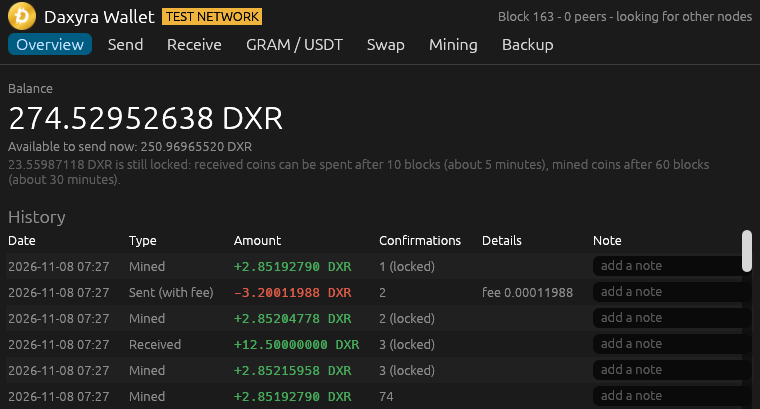
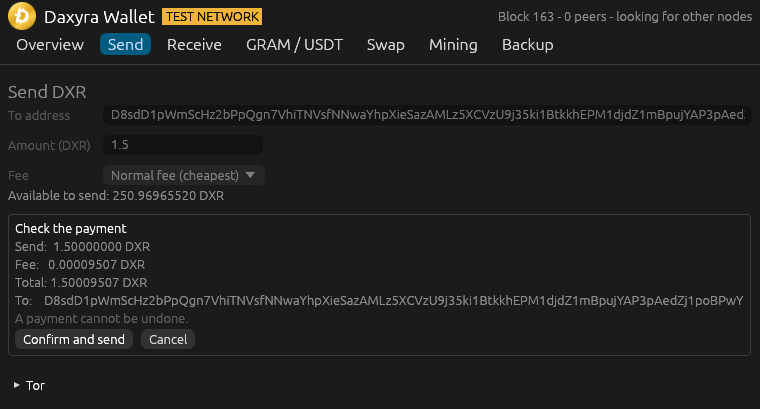
Daxyra Wallet: balance, send, receive, GRAM / USDT and swaps (test networks), mining and backup in one window.
Wallet file encrypted with ChaCha20-Poly1305 + Argon2id, restorable from 24 words.
Follows the chain with the most work and fully validates before switching branches.
Specifications
| Ticker | DXR |
|---|---|
| Total supply | 24,000,000 DXR |
| Smallest unit | 0.00000001 DXR |
| Block time | 30 seconds |
| Initial block reward | 2.85192790 DXR |
| Halving | Every 4,207,680 blocks (~4 years) |
| Algorithm | RandomX (PoW) |
| P2P / wallet ports | 24080 / 24081 · testnet 44080 / 44081 |
| Mainnet launch | To be announced |
| Seed nodes | testnet: 80.78.30.183:44080 2xy5l5efhbsxiqaht5qwujbnqsiap4xyvto4334sqejge6nyrhsu5syd.onion:44080 Only with --proxy, which sends everything through Tor, do nodes connect to the Tor address as to any other node; otherwise they only ask it, through Tor, which nodes can pass their payments on, also when it is given with --peer or typed into the wallet app. Give --peer only the Tor addresses of nodes that your computer does not also reach directly, and that do not connect to it by themselves. |
| Era | Reward / block | Total mined |
|---|---|---|
| 1 (years 0–4) | 2.85192790 | 12,000,000 |
| 2 (years 4–8) | 1.42596395 | 18,000,000 |
| 3 (years 8–12) | 0.71298197 | 21,000,000 |
| 4 (years 12–16) | 0.35649098 | 22,500,000 |
| 5 (years 16–20) | 0.17824549 | 23,250,000 |
| After about 116 years the reward reaches zero and miners earn transaction fees. | ||
Download v0.9.0
Test release running on testnet. The cryptography has not been independently audited; do not use it for real value.
Daxyra Wallet Recommended
Wallet and miner in one window. This is all most people need.
Windows (daxyra-wallet.exe) Linux x64daxyra Command line / node
Command-line program: node, miner and wallet. For servers and scripts.
Windows (daxyra.exe) Linux x64- Windows may show "Windows protected your PC" because the file is not code-signed yet: click More info, then Run anyway. Allow network access if the firewall asks.
- Linux: run
chmod +x daxyra-wallet-*-linux-x64before opening it. - macOS: no prebuilt file yet; it can be built from the source code once that is back (see below).
- Before you open a file, check the download as shown below.
- Using Tor Browser? This site is also at
http://vq56g77v5llyytsfxme4qxfwf5ievpqptfyvv5u22yn7j4tdchpq2dad.onion/. On daxyra.org, Tor Browser shows a .onion available button in the address bar: click it to switch to the .onion address (it does not switch by itself). - The source code (MIT license) is moving to our own server and will be back here soon.
Check the download
SHA256SUMS.txt lists the SHA-256 checksum of every file of this release and is signed with the Daxyra release key. Download it, its signature SHA256SUMS.txt.asc and the key daxyra-release-key.asc into the folder of the file you downloaded, then:
- Import the key, unless you already have it from an earlier release (then keep the one you have, so that a changed key stands out):
gpg --import daxyra-release-key.asc gpg --verify SHA256SUMS.txt.asc SHA256SUMS.txtmust say Good signature, and the Primary key fingerprint line it prints must be the fingerprint below. The warning that the key "is not certified with a trusted signature" is normal. If the fingerprint differs, do not run the program.sha256sum -c --ignore-missing SHA256SUMS.txtmust say OK for your file (--ignore-missingskips the files of the list that you did not download).
Release key fingerprint: 6BEB 7E86 90DA 2492 8F8C F63D 3A94 12EE C0F0 A6F2
On Windows, gpg and sha256sum come with Git for Windows (type the commands in Git Bash), and gpg also with Gpg4win. To see a file's checksum, type the first command below in PowerShell, or the second in a command prompt: it must be the one on that file's line in SHA256SUMS.txt (capital or small letters do not matter). That shows the file matches the list; only the signature shows that the list comes from the release key.
Get-FileHash .\daxyra-wallet-v0.9.0-windows-x64.exe
certutil -hashfile daxyra-wallet-v0.9.0-windows-x64.exe SHA256
Getting started
Option 1: the wallet app (easiest)
- Download daxyra-wallet.exe above and open it.
- Choose the network (currently testnet).
- Click Create a new wallet, set a password, then write the 24 recovery words on paper. Anyone with them can spend your coins.
- Open the Mining tab, choose the number of CPU threads and click Start mining.
- Mined coins can be spent after 60 blocks (~30 minutes), received coins after 10 blocks (~5 minutes).
On today's test network a payment may wait instead of leaving: through Tor, the wallet sends it only to nodes it has learned of through Tor and that your computer does not reach directly, and the test network does not have enough nodes for that yet. The wallet then says so and offers to send it without Tor, but then the nodes it first reaches may see your IP address. A payment that has not left when you close the wallet is sent again the next time you open it, if that is within a day and a half of making it: through Tor, or directly if you have chosen meanwhile to send without Tor.
Option 2: command line
Rename the file to daxyra.exe, open PowerShell in its folder and run:
# create a wallet (asks for a password, prints 24 recovery words)
.\daxyra.exe new-wallet

# show your address
.\daxyra.exe address

# run a testnet node and mine on every CPU core
.\daxyra.exe --testnet node --mine (.\daxyra.exe address)

# in another window: balance, send, info
.\daxyra.exe --testnet balance
.\daxyra.exe --testnet send --to D... --amount 1.5
.\daxyra.exe --testnet info
On today's small test network, a payment sent with these steps waits until the node can reach another node through Tor, for at most a day and a half: after that it is not sent, and its coins can be spent again, so it must be made again. The wallet app offers to send such a payment without Tor, and if you start the node again with --no-tor, it sends the payment directly, but the first node that gets it then sees your IP address.
Connect to another machine
From version 0.9.0 the program finds the network through the built-in seed node, with nothing to type. With an older version, add --peer 80.78.30.183:44080. To add a machine of your own, use its IP. Open port 44080 (testnet) in your router or firewall if others should connect to you. The nodes you connect to check that port before they pass your address on: while it is closed, your IP address is neither stored nor passed on.
.\daxyra.exe --testnet node --peer <IP>:44080Pruned node and light wallet
# on a server: a pruned node that light wallets can use
daxyra --testnet node --prune --wallet-listen 0.0.0.0:44081

# on any computer, without downloading the chain
daxyra --testnet --node <IP>:44081 balance
daxyra --testnet --node <IP>:44081 send --to D... --amount 1.5
The connection to the node goes through the Tor built into the program, so the node does not see your IP address. If your network blocks Tor, try --tor-bridges auto (it needs Tor Browser installed on the computer); --no-tor connects directly, and the node then sees your IP address. The node could still show a wrong balance (it cannot take coins), so use a node you trust, ideally your own.
A node started with --wallet-listen 0.0.0.0:44081 treats every wallet as a stranger, one on its own computer too: info there does not show its peers or its mining (the node's log does), and it passes the payments handed to it on at once, directly, not through Tor, also those from send on that server. For your own payments through Tor, use the wallet app, or a node without --wallet-listen. A node open to everyone (--wallet-listen 0.0.0.0) names a payment as pending only once the network has heard of it, so for about a minute and a half after a payment through it, the balance may still count the coins it spends; another payment of those coins is refused.
Roadmap
- Core chain on one machine
- Peer-to-peer network, chain sync, multi-threaded mining
- Encrypted wallets with recovery phrases
- Dynamic blocks and fees, pruned nodes, light wallets, wallet app
- Prebuilt releases, public testnet and seed node (done); cryptography audit
- Main network launch: date to be announced